
Six complaints live event teams keep making online, and what we did about each
We did not start from a feature list. We started from what people were already complaining about, and worked backwards. Here are the six that came up over and over, and the honest answer to each.
Search for how people run live events and you find the same conversation happening in a dozen places: production forums, church tech communities, stage management threads, AV subreddits. The vocabulary changes. The complaints do not. Six of them come up so consistently that they are effectively the specification for this category of software.
What follows is each complaint, why it is a genuinely hard problem rather than a lazy one, and what we actually built. Where we have not solved something, it says so.
1. "The formulas broke and I did not notice"
The spreadsheet run of show is still the default almost everywhere, and its most common failure is not a wrong number, it is a wrong number that looks right. A row gets inserted and a SUM range does not extend. A duration is typed as text. Somebody drags a fill handle one cell too far. This is well known enough that vendors in this space write about it: Shoflo, now LASSO's Rundown module, published "3 Excel Formula Frustrations That Every Event Producer Runs Into" back in 2019, whose argument is that Excel formulas break constantly and every break raises the chance of an error reaching the show.
The underlying issue is that a spreadsheet has no concept of a run of show. It does not know that row 12 is a segment, that its duration must be a length, or that the sheet must sum to the slot you were given. It will happily hold nonsense.
What we did: the durations are typed, the start times are derived from the durations rather than typed in, and the totals are always live. On import, anything we cannot read as a duration is flagged in red in the preview rather than quietly turned into a number, because a value quietly coerced to something plausible is exactly what lets a broken sheet look healthy. There is no formula to break because there is no formula.
2. "The sheet went stale the moment anything changed"
One song added in the green room, one speaker swapped, one segment cut, and every printed copy in the building is now wrong. The team knows this, which is why the printed sheet is usually annotated in pen by the second hour, and why nobody fully trusts it. The document is a snapshot of a plan that stopped being true.
What we did: nothing is a snapshot. The backstage monitor, the speaker screen and the read-only share link all read from one timeline continuously, so a change made in the console is on every screen in the building without anyone redistributing anything. This is also why the share link is a link and not an export.
3. "The speaker ran long and nobody could do anything"
This is the most-described failure of all, and the reason is structural rather than human. The person who can shorten a segment is on stage, and the person who knows the segment is long is in the booth. Common advice is to build in buffers, and it is good advice: putting five to ten minutes between major segments absorbs the overruns and AV changeovers that otherwise cascade through the whole schedule. But buffers only limit the damage. They do not tell the speaker anything.
It is also worth being precise about how little slack some cues have. Calling a show, standby goes about ten to fifteen seconds before the action and GO lands on the moment itself, so a cue called ten seconds late is not slightly late, it is past the standby. "Roughly on time" is not a standard that survives contact with a technical rundown.
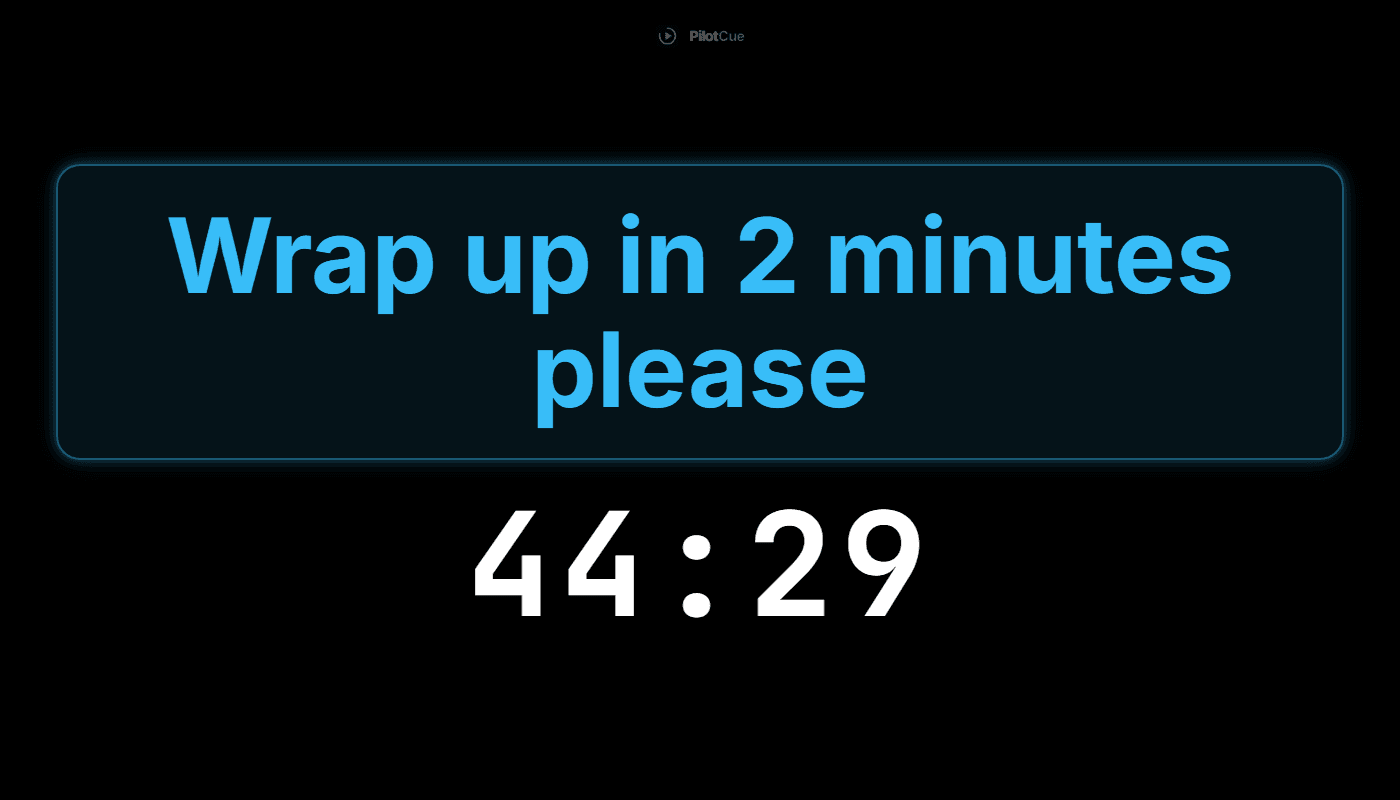
What we did: the speaker gets their own screen with the one number they can act on, time remaining, counting down. When words are needed you type them into the console and they appear on that screen, with a flash if it has to be noticed rather than read. And the producer can trim or extend the running cue by a minute at a time, with everything below it moving automatically.
4. "The tool was more work than the spreadsheet"
This complaint deserves respect, because it is usually accurate. Purpose-built rundown tools are often built for full-time broadcast and production teams, and they carry the depth those teams need. Dropped into a two-person AV crew or a rotating volunteer team, that depth is cost: things to configure, concepts to learn, and an afternoon of rebuilding a sheet that already worked. Teams try it once, conclude the spreadsheet was faster, and go back. They are not wrong about their own situation.
This category also moves under people, which does not help. Shoflo, one of the better-known names in run of show, was acquired by LASSO in June 2025 and now sits inside that platform as its Rundown module. Consolidation is normal in a young category, but it does mean anyone choosing a tool is also betting on where it will live in two years.
What we did: the entry point is your existing sheet, not our format. Paste your rows, look at the preview, and you are running. There is no project structure to set up, no fields to define, and no import template to download and conform to. If you can copy cells out of Google Sheets you can be on air in a few minutes, and if you would rather not use your own sheet there are four templates that already hold real durations.
| What has to happen | Spreadsheet, phone timer and group chat | One console |
|---|---|---|
| Get the rundown in | It is already there | Paste it, check the preview |
| A segment runs five minutes long | The sheet updates for whoever is looking at that sheet; every printed and shared copy is now wrong | Every time below it moves by itself, on every screen |
| Tell the speaker to wrap up | Hand signals, or walk into their eyeline | Type it; it appears on their screen |
| Crew need to know where the show is | Ask out loud, or read a printed sheet that predates the last three changes | A backstage monitor everyone can see |
| A volunteer arrives twenty minutes before doors | Brief them verbally and hand them paper | Point their camera at a QR code |
| Find out what actually took how long | Only if somebody remembered to note it | Planned against actual, per cue, automatically |
5. "Our volunteers change every week and cannot be briefed"
Church tech teams say this most, but it applies to any organisation running on rotating help: conferences with student volunteers, festivals, community theatre, nonprofits running a gala once a year. The show is run by someone who was not at the planning meeting, does not know last week's workarounds, and arrived twenty minutes before doors.
Every tool implicitly assumes a trained operator. That assumption is what breaks: the knowledge lives in the person who is not there.
What we did: the answer is that the screens are self-explanatory rather than that the training is better. A backstage monitor showing the current item, the next three, and a countdown needs no briefing. A share link opened from a QR code needs no account. And a second console can be opened on another device mid-show, so a handover is somebody else opening the same show rather than a conversation.
6. "We plan next week from memory"
The quietest complaint and the most expensive one. Almost nobody records what actually took how long, so the same segment is under-budgeted every single time, and the team learns to treat the sheet as fiction. Everyone knows the 10:45 finish is optimistic. Nobody has the numbers to argue it.
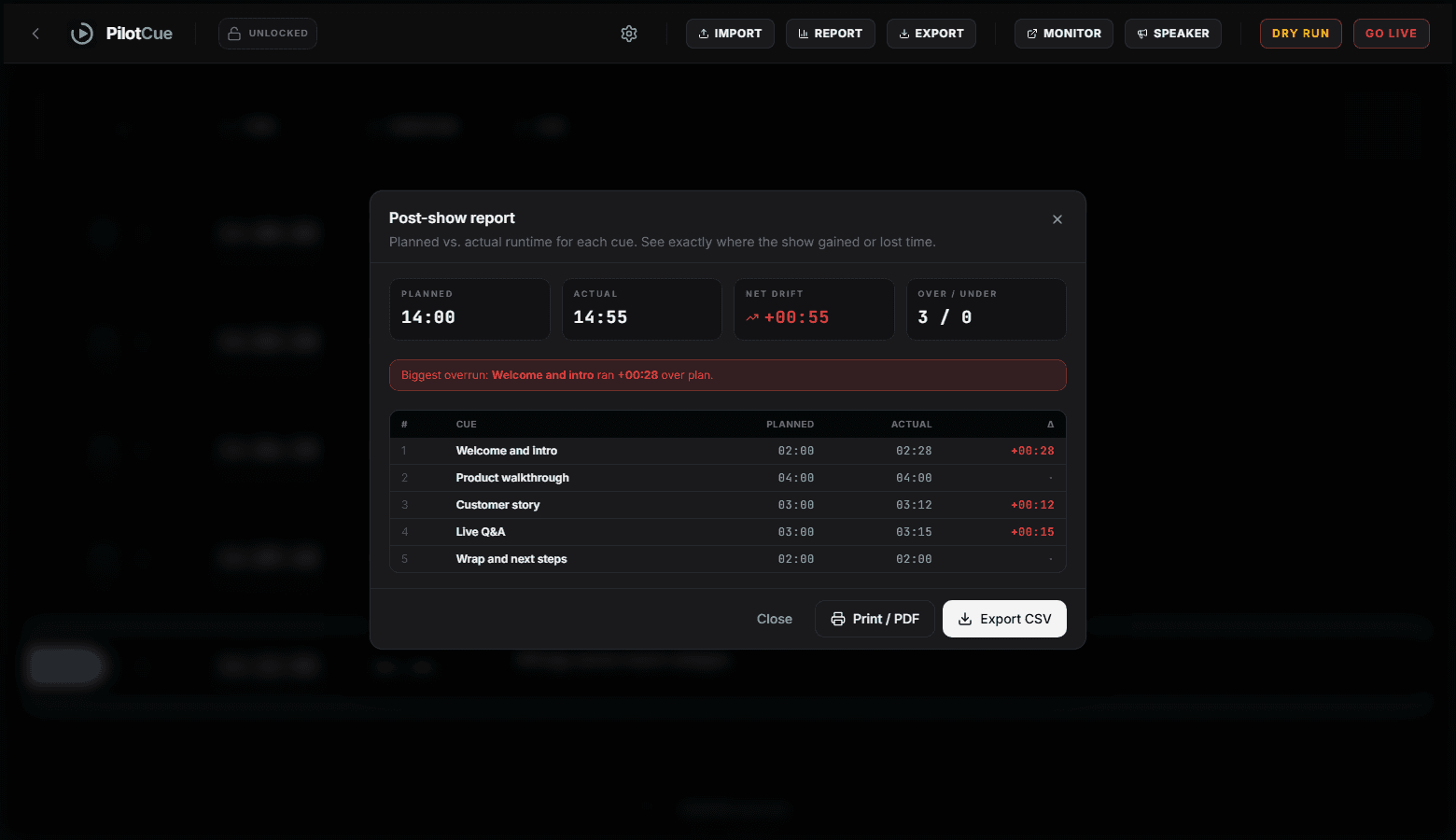
What we did: stopping the show builds the report. Planned against actual for every cue, the net drift, and the biggest single overrun called out by name, exportable as CSV or PDF on a paid plan. It measures the segments that ran long; a cue you cut short is recorded at its planned length, so this tells you where you lost time rather than where you gained it.
Where we are honest about the gaps
A post like this is not worth much if it only lists wins, so here is the current state of the things we have not finished.
- Drag and drop on the grid does not work by touch yet, so reordering on a tablet means using a mouse. It came out of our first real field test and it is on the list.
- Some control actions still fail quietly. Going live now reports its errors properly. Reordering and advancing cues do not yet, so a failure there is more silent than it should be.
- We are a young product. If you need decades of broadcast workflow, asset management and MOS integration, a specialist newsroom system is a better fit and we would say so.
- We do not process refunds automatically. Our terms make fees non-refundable except where the law requires otherwise, and there is no self-service refund flow.
- Export gating on the free plan is enforced in the browser rather than on the server, which is a correctness gap on our side, not yours.
The complaints are the specification. Anything that does not answer one of them is a feature we built for ourselves.
- Is this better than a spreadsheet?
- For authoring a rundown, a spreadsheet is genuinely good and plenty of excellent shows are run from one. What a spreadsheet cannot do is drive screens. The moment more than one person needs to know where the show is, you are maintaining copies by hand, and that is the thing that fails under pressure.
- Do I need to move my whole team over?
- No. The most common way in is one person driving the console while everyone else looks at a share link or a backstage monitor. Nobody else needs an account.
- What does it cost?
- There is a free plan covering two events with up to 25 cues each. Beyond that there is a one-off 72 hour all-access pass, which is the right shape if you have one show coming up, and a monthly or yearly plan if you run shows regularly.
- What happens if it breaks during a show?
- Fair question, and the honest answer is that it has. Two failures in our go-live path reached real users, including one where shows ended themselves seconds after starting, and we found and fixed the cause of each. Going live no longer depends on the live connection holding, and the auto-end logic that caused the second one now requires the show to have actually been running. On a paid plan you can export a PDF before doors if you want paper as a fallback.