
You should not have to retype your rundown to use a tool
The first hour with any new tool goes on fighting its format. That hour is the reason most teams stay on the spreadsheet, and it is the part we decided to delete.
Ask anyone who runs live events what they use and the honest answer is usually a spreadsheet. Not because they have not heard of the alternatives, but because the spreadsheet is already correct. It has the segments, the lengths, the owners, the notes, and three years of accumulated fixes nobody remembers making. Asking someone to rebuild that in a new format is asking them to volunteer for an afternoon of data entry and a fresh set of mistakes.
So the importer is not a convenience feature here. It is the whole entry point, and it is where most of the difficult engineering went.
What "paste it in" has to survive
Real rundowns are not tidy. Here is what actually arrives, and what each one does to a naive parser.
| What is in the sheet | Why it breaks things | What happens instead |
|---|---|---|
| Durations as words: "15min", "1hr 20 mins", "90s" | A parser expecting mm:ss gets a string and gives up, or stores zero | Read as 15:00, 1:20:00 and 01:30 |
| A banner row above the headers | The header row is not row one, so every column maps to the wrong field | Header row detected and the banner skipped, as long as your header names at least two familiar columns |
| "0:05" in the duration column | Five seconds and five minutes are both defensible readings | Resolved against the sheet's own timeline, with a toggle to override |
| A blank duration cell | One missing number invalidates every time below it | Filled from the start-to-end span, else the gap to the next start, else five minutes, and starred as a guess |
| Only the first start time filled in | Every other row has no clock time at all | Chained from the one you gave, which is how the sheet was meant to be read |
| A column we do not have a field for, like Owner or Mic | Data is silently dropped, which is worse than failing | Offered as a new column in your runsheet, with a checkbox to decline it |
| Excel data-validation dropdowns | Become dead text | Preserved as real dropdowns in the grid, from an .xlsx or .xlsm. A paste or a .csv carries no validation data to preserve |
Sources are the boring part but they matter: paste from Sheets or Excel, .csv, .xlsx, .xlsm, .xls and .ods. Paste works the moment the dialog opens, so Ctrl+V is genuinely the first thing you can do.
The screen that makes an import safe
None of the intelligence above would be worth much if you had to trust it blind. The preview is the answer: it shows you the finished rundown, editable, before a single cue exists.
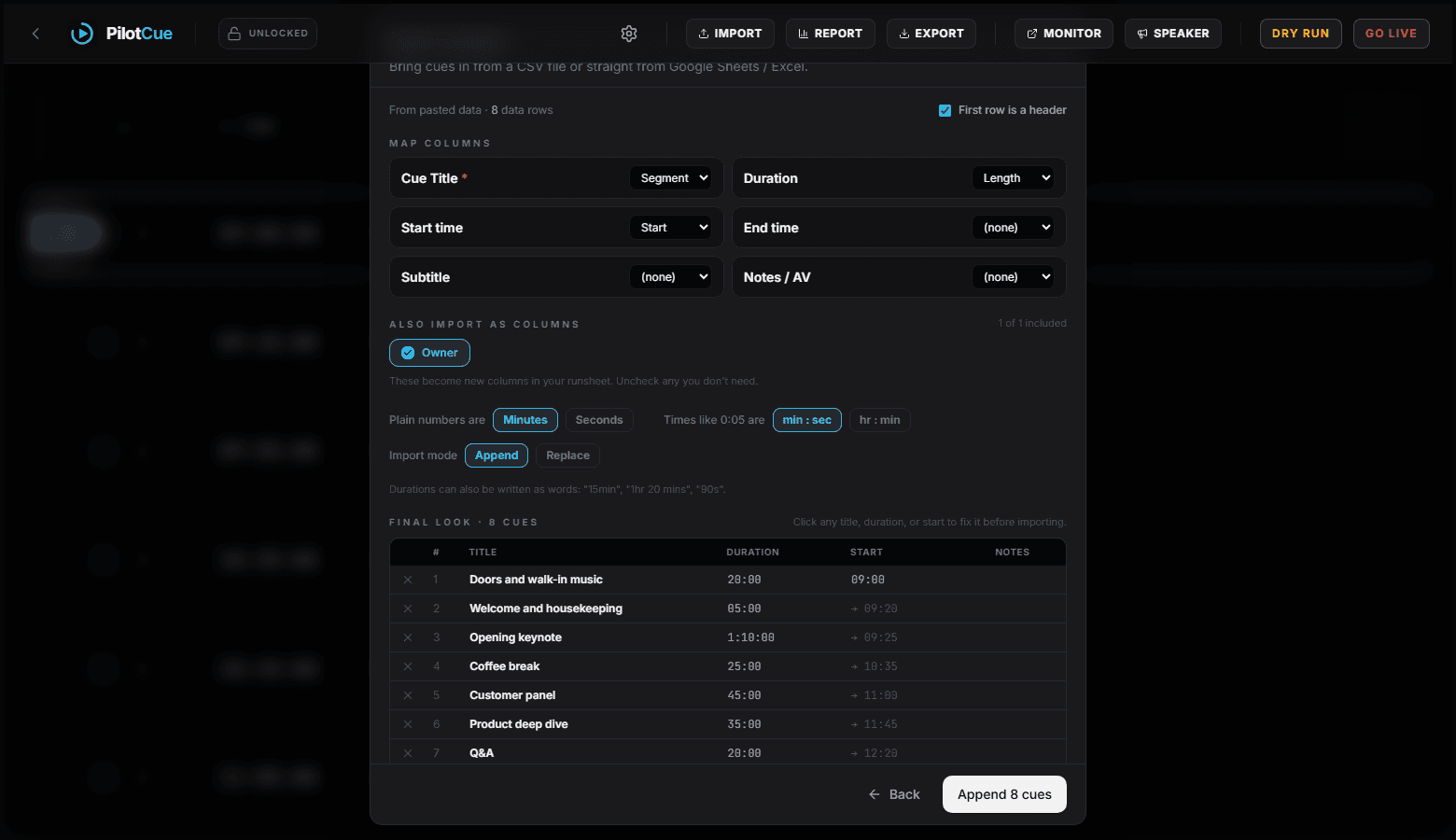
- Every title, duration and start time is editable inline. Fix it here, not in the source sheet.
- Skip a row and restore it, without editing your spreadsheet.
- A totals line, so "Total 45:00 · 09:00 → 09:45" tells you immediately whether the maths matches what you promised the client.
- A duration that reads as zero, and any start time you type that is not a time, are marked in red rather than quietly accepted.
- Replace mode states how many cues it will delete, and the number is frozen so it cannot creep up while you read it.
An importer that cannot be inspected before it commits is not an importer, it is a dare.
A bug this post found while it was being written
The screenshots here are captured by a script that drives the real product, and while capturing them we pasted a rundown with a title row above the headers. It parsed as one single column: every row became a title like "Opening keynote 1hr 10 mins CEO" and every duration fell back to the five minute default.
The cause was one decision. The delimiter was being sniffed from the first non-empty line of the paste, and a banner row contains neither a tab nor a comma, so a tab-separated sheet was read as comma-separated. It now counts delimiters across the first several lines before deciding, and there is a test holding that behaviour in place.
We are telling you this because it is the kind of failure worth understanding when you evaluate any import feature. It was silent. Nothing errored. The preview was populated and looked plausible, and you would only have noticed at the point where every cue was five minutes long. The reason to insist on a preview screen is precisely that parsers fail this way rather than by crashing.
What to do with your sheet before you paste it
- Nothing, mostly. Try it first: the mapping is usually right, and the preview will tell you if it is not.
- If you have merged cells across your columns, unmerge them. Merged cells are the one thing no clipboard format survives well.
- Keep durations as lengths and let the start times be computed. If your sheet is written in clock times it will still import, but it will be wrong the moment the day slips.
- Select the header row along with the data. It is what lets the columns map themselves.
- Can I import into an existing runsheet without losing it?
- Yes. Append adds the imported cues to what is already there. Replace clears the sheet first and tells you how many cues that will delete before you confirm.
- What if my duration column is just numbers, like 15 and 40?
- There is a toggle for whether plain numbers mean minutes or seconds, and it applies to the whole import so you set it once.
- How large a rundown can I paste?
- The preview shows the first 200 rows so the screen stays usable, and the import itself is not limited to that. The free plan caps a single event at 25 cues.
- Does it read my formulas?
- It reads the values your formulas produce, which is what you want. A running-total column of computed start times comes through as those times.